Lockers
Book your locker for the current academic year in the Lisbon School of Architecture Locker Management System.
Book a locker
-
Sign in
On the home page, click “Login”. You are redirected to the Faculty authentication page.
Open cacifos.fa.ulisboa.pt -
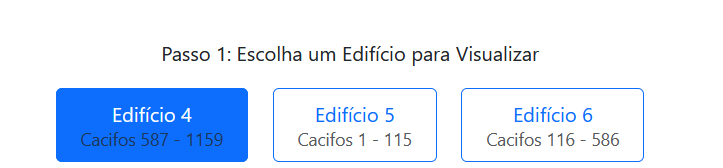
Choose the building
If you do not have a locker yet, the buildings with available lockers are shown. Each button shows the range of locker numbers in that building (e.g. “Edifício 4 | Cacifos 587 - 1159”).
-
Choose the locker
The locker plan of the building is shown, organised by rooms and floors. Click a green locker to select it: it turns blue.

-
Confirm your choice
At the bottom of the page, click “Confirmar Escolha”. The locker is booked and the booking message shows the period, place and hours to collect the key.
-
Collect the key
The locker is only assigned after you collect the key. It then becomes confirmed and a green message shows its location.

Colour key
- Green: available.
- Red: taken or unavailable (broken, etc.).
- Yellow: your currently booked locker (if you have already chosen one).
- Blue: the locker you selected.
Change a booking
While your locker is only “Reserved”, you can change your choice: go back to step 3 and select another green locker. The previous booking is cancelled automatically.
Once the locker is confirmed (key collected), the choice can no longer be changed on the platform.